Built by an airline pilot, for airline pilots

The logbook that flies with you.

Crewlog imports your roster, scans your ACARS, parses your OFP, tracks your aircraft live, and keeps you legal — so the only thing left to do is fly the airplane.

iPhone · Apple Watch · iPad No subscription required Data stays on device
01
One flight, three moments

Organized around how
pilots actually work.

01 / PREFLIGHT

Everything you need, before you sign in.

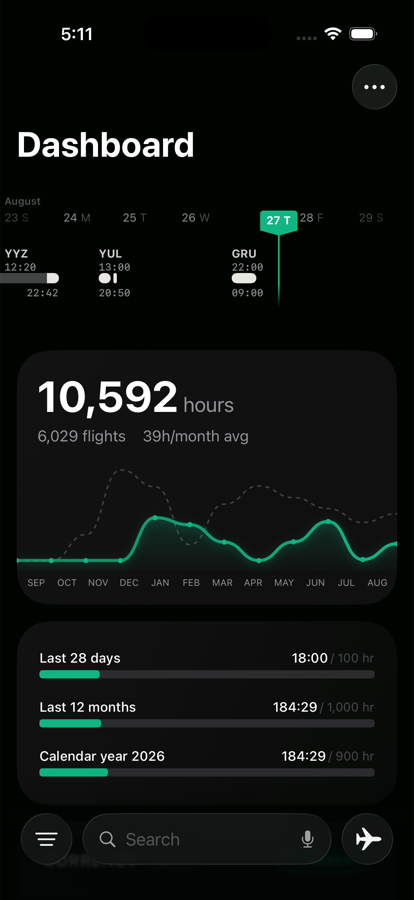
Your month on a rail, your next leg on a card, and the three limits that decide whether you can take it — all on one screen, before the van leaves the hotel.

  • Roster timeline — pinch to zoom the whole bid month
  • 48-hour flight deck — swipe between back-to-back legs
  • 28-day, 12-month and calendar-year limits, live
02 / LEGALITY

Current — and able to prove it.

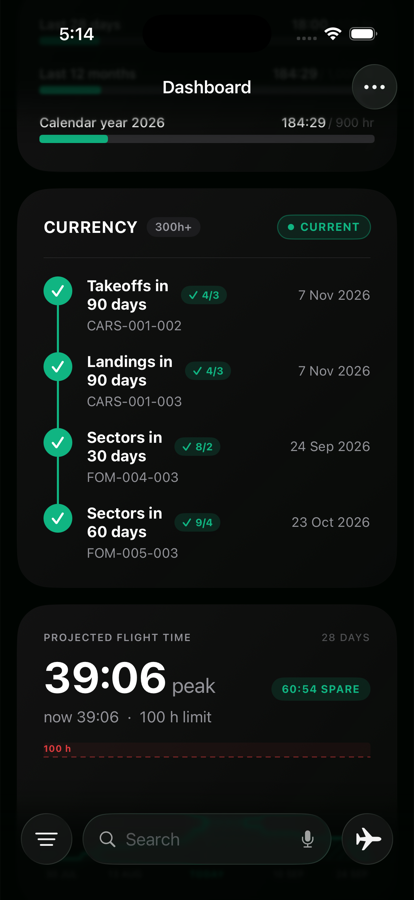
Takeoffs, landings and sectors counted against the rule set that applies to you, each with the date it expires. Then the 28-day total carried forward across everything still on your roster.

  • Both rule sets — under and over 300 h on type
  • Expiry per requirement, not one vague verdict
  • Projected flight time — see the limit before you bid
03 / DEBRIEF

The logbook writes itself.

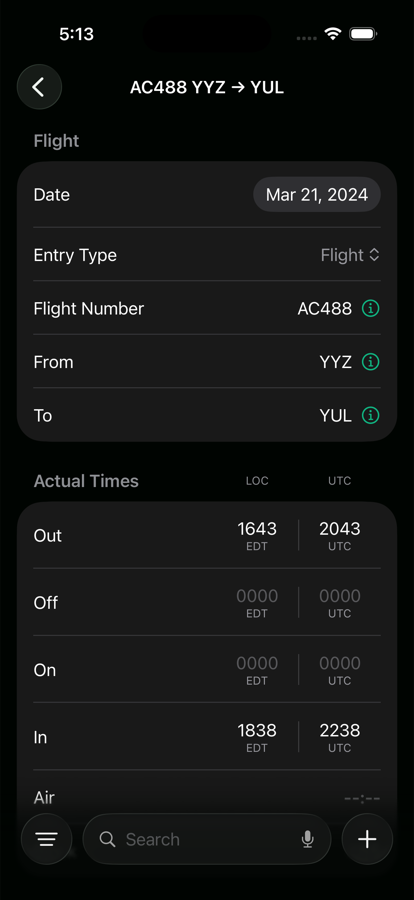
Actual OUT/OFF/ON/IN flow back into the entry as the flight unfolds. Scan the ACARS and the leg is done before the bus arrives.
  • ACARS camera scanner — OOOI, crew list and acceptance pages
  • Auto night-time via civil twilight along the route
  • Roster ↔ logbook reconcile — no double entry
Crewlog dashboard: roster timeline, 10,592 career hours and the 28-day, 12-month and calendar-year flight time limits.
Crewlog 90-day currency card showing takeoffs, landings and sectors against their rules with expiry dates, above the projected flight time chart.
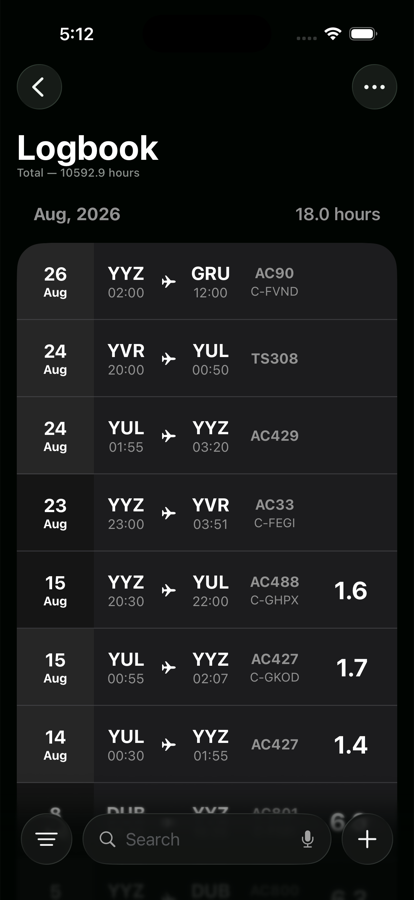
Crewlog logbook list: flights by month with route, times, flight number, registration and block hours.
Auto-Import

Point your camera at the ACARS. Done.

Crewlog reads your cockpit display, your block report, your operational flight plan — and turns them into a logbook entry in seconds.
  • ✓ACARS camera scanner — reads the OOOI page, the EFB crew list and the flight acceptance page. OUT/OFF/ON/IN, block and flight time, registration, gate, even the MEL block.
  • ✓Flight plans & post-flight reports — Air Canada LIDO, WestJet dispatch release, and Air Transat’s Mission+ report, which carries the times the flight actually made.
  • ✓Roster PDF parser — Air Canada Block Report, Air Transat Line Award, WestJet Crew Roster Report. Re-import a revision and only the changes land.
  • ✓Calendar watch — Crewlog scans every calendar, dedupes against your logbook, and tells you when a roster flight changes. It never writes back.
  • ✓Auto-fill from flight number — type AC56, press Enter, and the route, schedule, tail and type land with it.
  • ✓Bring your old logbook — LogTen Pro, Crewsware and airline monthly summaries, parsed on the phone. Nothing is uploaded.
ACARS · BLK REPORT PARSED
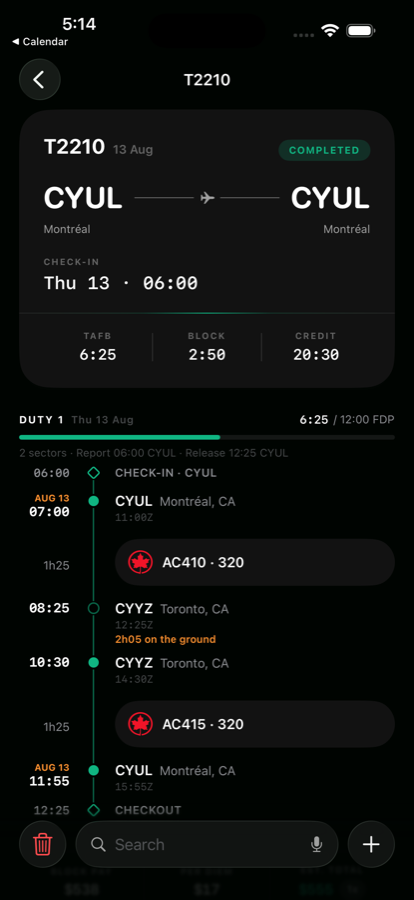
Crewlog pairing page: T2210 with TAFB, block and credit, a duty rail showing check-in, both sectors, 2h05 on the ground and checkout, against a 12:00 FDP.
Roster intelligence

Your bid month, parsed and
on a timeline.

Drop your roster PDF in once. Crewlog rebuilds the month — every pairing, every leg, every layover — and draws it as a rail you can pinch to zoom.

  • ✓Three carriers parsed — Air Canada Block Report, Air Transat Line Award, WestJet Crew Roster Report.
  • ✓Duty rail per pairing — solid while the duty clock runs, dashed through the rest, with TAFB, block and credit up top.
  • ✓Report to checkout — every sector, its ground time, and the FDP it all has to fit inside.
  • ✓Partner crew — captain, FO and relief pilot merged into your pilot database.
  • ✓Re-import safely — a revised roster only adds what changed; flights already logged are skipped.
Live Tracking

Watch your aircraft, in real time.

Crewlog talks to ADS-B, FlightAware and AeroDataBox so you always have a live picture of where the metal is — even when the gate doesn't.

  • ✓Real-time tracking — position, altitude, ground speed, gate-to-gate progress, refreshed every 30 seconds.
  • ✓Multi-source fallback — FR24 → AeroDataBox → FlightAware. One provider dark? Crewlog tries the next.
  • ✓Pilot-flight highlight — multiple legs on the registration today? Yours is highlighted.
  • ✓Auto-attach times — actual OUT/OFF/ON/IN flow back into the entry as the flight unfolds.
C-FRTW · AC056 · LIVE
Enroute B789 · C-FRTW FL410 · M.85 · 487 kts
YYZ DXB
Altitude
FL410
Mach
.853
Ground
487 kt
ETA
19:32Z
FDP — AC56 YYZ→DXB
00:00 14:00
0:00
Actual FDP · 55m under limit
Max FDP · 3 pilots
14:00
Required rest
12:00
Sectors
1
Crew
3 + 8
Latest OUT
22:30Z
Latest IN
10:30+1
FDP & Compliance

The math your contract demands. Done before you sign in.

Crewlog's FDP calculator handles augmented crew, sectors, report time and required rest — and shows the latest possible departure before the clock runs out.

  • ✓Crew-aware limits — 2-, 3- and 4-pilot augmented crew rules built in, read from the CAR table your operation flies under.
  • ✓Body clock, not gate clock — max FDP is read against the zone your duty actually acclimatized you to, at one hour per 24 h there (CAR 700.28(5)).
  • ✓Latest OUT / latest IN — in UTC and airport-local time.
  • ✓Crew rest, split for you — the break window divided one slot per pilot, with an alarm that rings through Silent.
  • ✓Over-limit warnings — the FDP turns red before a change puts you over, and critical alerts fire at the deadline.
Not a mockup

This is the app, on a real logbook.

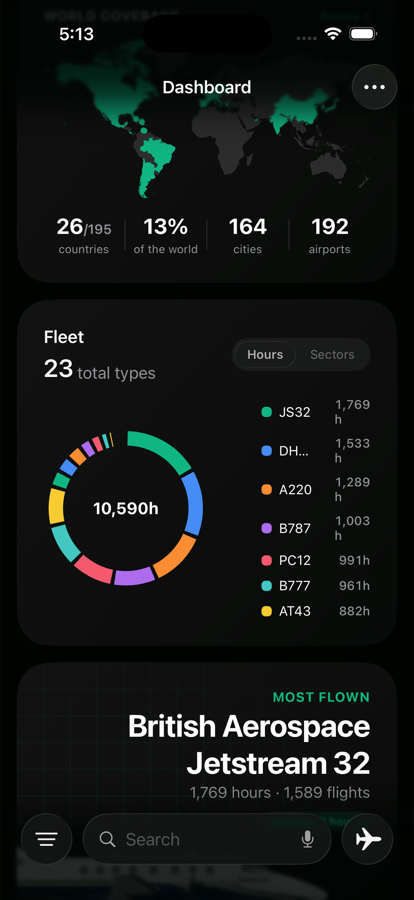
Every screen below is a screenshot from a working install — 6,029 flights, 10,592 hours, 23 types, 167 airports. Nothing staged.
0
Regulator PDF formats
0
Live data sources
0
Servers · ads · trackers
Everything else

Built around how pilots actually work.

A deep feature set that comes from years on the line — not from a feature roadmap.

48-hour Next Flight card

Your next leg, glance-able from the dashboard. Live progress bar the moment the flight starts moving.

Currency dashboard

90-day landing & takeoff currency, monthly average, type-rated hours and career totals — always up to date.

Apple Watch app

Six pages on the wrist — schedule, the live flight card, OOOI tiles, crew rest, FDP and the load sheet. Five complications, each opening to its own page.

GPS auto-detect

Arm it and the watch calls OUT, OFF and ON from GPS alone — in airplane mode, with no signal, timed to the physical event rather than the moment it was sure.

Widgets & Live Activities

The flight card on your Lock Screen and Dynamic Island from six hours before push. Crew rest gets its own.

Action button stamp

One press logs the next OOOI event on the current flight. No unlock, no app. Siri does it too.

PDF logbook, 5 formats

TCCA, FAA, EASA, CASA or ICAO column layouts, with signature and certification pages to sign.

iCloud sync

Your own private iCloud database, in step across devices. No account, no server of ours.

Crew rest & alarms

The break window split one slot per pilot, with an alarm that rings through Silent and Do Not Disturb.

Logbook check-up

Duplicates, missing airline codes, empty night columns and re-dated flights — each shown before it writes, each undoable.

Build your own dashboard

Fourteen cards to reorder or hide, and your own time and count columns on every entry.

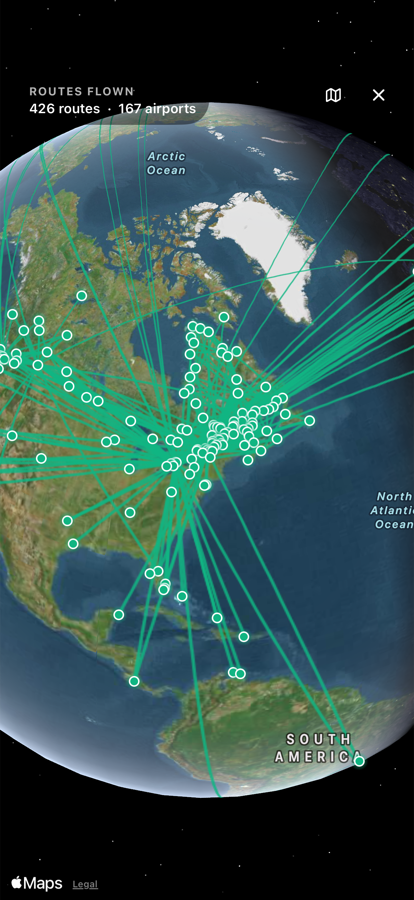
Interactive globe

Every route you have ever flown, drawn on a globe you can spin. Countries, cities and airports counted.

Pilot database with merge

Every pilot you've flown with, auto-collected. Spot duplicates, merge in one tap.

Aircraft database

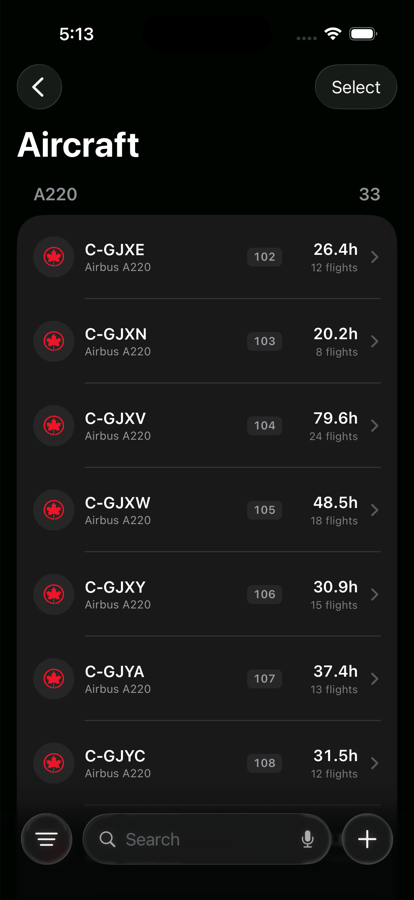
Type cards with images, registrations, fin numbers, manufacturer data — searchable.

Airport detail + weather

METAR, TAF and the expected runway with head- and crosswind, on every airport page. Cached for an offline glance.

Nearest airport lookup

One tap finds the closest airport to your position. No typing.

Dual-time entry

Type local, see UTC — and vice-versa. Real airport timezones, DST included.

Auto night-time

Civil twilight along the great-circle path. No spreadsheet math at 2am.

Import & export

Never trapped. Bring a career in from LogTen Pro, Crewsware or your airline’s monthly summary; take it out as CSV or a printed logbook.

Bulk aircraft editor

Re-tag fleet, fix categories, change make/model across hundreds of entries.

Pairing pages

A duty rail per pairing — report, sectors, ground time and rest — plus a library of saved trips with hotel and pickup.

Smart suggestions

Type the fin, get the registration. Type the registration, get the type.

Layered roster + log

Pairings and entries reconcile automatically — no double-entry, no drift.

Designed for the cockpit

Dark UI, big touch targets, monospace numbers, color-coded deltas. Readable at 41,000 ft, usable with one hand during a turn.

FL410 · TESTED
Roster and flight-plan parsers for AC, TS and WS — liveries and logos for the rest of the world
Privacy

Your logbook stays on your phone.

No accounts. No tracking. No subscription tax.

Your roster, your hours, your pairings — they live on your iPhone, not on someone's server. Sync is your own private iCloud, not an account with us. Live data calls go directly from your device to public providers. The app doesn't talk to a backend of ours at all.

  • ✓All data stored on device, synced only through your own iCloud
  • ✓No tracking. No analytics. No ads.
  • ✓Imports are parsed on the phone — no file is ever uploaded
  • ✓API keys stay in the device Keychain, never in iCloud
  • ✓CSV and PDF export — your data is always yours
  • ✓Works offline — METAR/TAF cached, roster always available
Pricing

Honest pricing for working pilots.

Pay once. Use forever. No subscription, no upgrade nags, no feature gates on what you've already paid for.

Free

$0

Get started. Log up to 100 entries.

  • Manual logging — full entry editor
  • CSV export — your data is portable
  • Aircraft + airport database
  • Calendar import
Download free

Pro Unlimited

$49ONE-TIME

Everything Crewlog can do, forever.

  • Unlimited entries
  • ACARS scanner + OFP parser
  • Roster PDF parser — block reports
  • Live ADS-B / FR24 / FlightAware tracking
  • FDP calculator
  • Interactive globe + world map
Get Crewlog Pro
Download

Stop typing.
Start flying.

Crewlog is on the App Store today. iPhone, Apple Watch & iPad · iOS 26+.